Pulling Up the Bootstraps
Research work by Merjen Kakajanova, student of International University for the Humanities and Development. Instructor Nurmyrat Allayarov.
Download the essay (PDF, 8 pages)
What happens in the few seconds between pressing a power button and seeing a login prompt, and why a computer has to build its operating system out of almost nothing every single time.
Every time a computer starts, it faces a problem that sounds like a riddle. To run a program, you need an operating system that can load it from disk into memory. But the operating system is itself a program, stored on that same disk. Something has to load the thing that loads things. The usual answer is a chain of progressively smarter programs, each just capable enough to find and start the next one, until the full operating system is running and can take care of itself.
Engineers named this process after an old joke about pulling yourself up by your own bootstraps, which is physically impossible and therefore a fair description of what the machine appears to do. The word was shortened to booting, and it stuck. On the earliest minicomputers the riddle had a blunt solution: a human being. An operator would flip switches on the front panel of a PDP-8 or an Altair to enter, bit by bit, a short loader program that could read a longer one from paper tape. Today the human has been replaced by firmware burned into a chip, but the shape of the solution is the same. A modern PC or phone climbs a ladder of five or six stages in a couple of seconds, and each rung was built to survive the limitations of the one below it.
This essay climbs that ladder from the bottom. It is also, in a roundabout way, a tour of what an operating system really is, because booting is the one moment when you can watch the OS assemble itself from parts.
01 Before the first instruction
Pressing the power button does not start the processor. It sends a signal to a small controller on the motherboard, which brings up the power supply rails in a carefully specified order and waits for each voltage to settle. Only once the power is stable does it release the processor from reset.
On many modern machines the main processor is not even the first thing to run. Intel chips contain a separate embedded microcontroller, the Converged Security and Management Engine, which boots its own firmware before the x86 cores are allowed to start. On recent AMD processors, a dedicated security processor based on an ARM core starts first, checks the firmware’s signature and even initializes the main memory before releasing the x86 cores. The computer you think you are booting is, in a sense, being booted by a smaller computer hidden inside it.
When an x86 core finally comes out of reset, it is deliberately primitive. It runs in real mode, a 16-bit compatibility mode that mimics the original 8086 of 1978, and it fetches its first instruction from a fixed physical address, 0xFFFFFFF0, sixteen bytes below the four-gigabyte mark. The chipset arranges for that address to point at the firmware flash chip. Those sixteen bytes usually hold a single jump instruction into the firmware proper. This is the only part of the whole sequence that is completely predetermined. Everything after it is software making decisions.
On a machine with many cores, only one of them, the bootstrap processor, starts executing. The others sit in a halted state, waiting. They will not be woken until much later, when the operating system kernel sends each of them a specific sequence of inter-processor interrupts and a pointer to code it has prepared for them.
02 Firmware in the dark
The firmware’s first problem is that there is no usable memory. DRAM is not a passive component that works the moment power arrives. Its controller has to be configured with the exact timings of the installed modules, and on modern systems it has to be trained: the firmware sends test patterns and adjusts signal delays, one line at a time, until reads and writes arrive reliably. Until that finishes, there is no RAM and therefore no stack, and most ordinary code cannot run.
Firmware authors work around this with a trick called cache-as-RAM. They configure the processor’s cache so that it never writes back to main memory, which turns a few hundred kilobytes of on-chip cache into a small scratch memory. Early firmware code runs entirely inside it, with a tiny stack, until memory training succeeds. Memory training is also why a computer with freshly installed RAM can take noticeably longer on its first boot: the firmware is doing the full calibration and saving the results for next time.
With memory working, the firmware moves on to the rest of the hardware. It finds and configures the PCI Express devices, assigns them address ranges, sets up the interrupt controllers, and runs the power-on self test that the term POST refers to. It also writes down what it has found. On PCs, that description takes the form of ACPI tables: structured data in memory that tells the operating system how many processors exist, where the devices are and how to put them to sleep. On most ARM systems a similar job is done by a device tree, a compact description of the hardware that is handed to the kernel. Either way, the firmware leaves a map behind so that the kernel does not have to probe every corner of the machine blindly.
BIOS and UEFI
For about thirty years, PC firmware meant the BIOS, an interface that dated back to the IBM PC of 1981. It offered a small set of services through software interrupts, still in 16-bit real mode, and its approach to booting was almost comically simple: read the first 512-byte sector of a disk into memory at address 0x7C00, check that its last two bytes are 0x55 and 0xAA, and jump to it.
Its replacement, the Unified Extensible Firmware Interface, grew out of Intel’s EFI project for the Itanium in the late 1990s and was taken over by an industry forum in 2005. UEFI firmware is effectively a small operating system of its own. It runs in 32- or 64-bit mode, has drivers, understands the FAT file system and can load ordinary executable files. Instead of jumping to a raw sector, it reads a list of boot entries stored in non-volatile variables and starts a program such as \EFI\BOOT\BOOTX64.EFI from a dedicated EFI System Partition. Booting stopped being a magic sector and became, more or less, running a file.
03 Five hundred and twelve bytes
The old BIOS path is worth a closer look, because its constraints explain a great deal about how bootloaders are built. A master boot record has room for only 446 bytes of code, followed by a 64-byte partition table with exactly four entries and the two-byte signature. Here is a complete boot sector that does nothing but print a greeting. Assembled, it fills those 512 bytes exactly:
bits 16
org  0x7C00                  ; BIOS loads us here
    xor  ax, ax
    mov  ds, ax
    mov  si, msg
.next:
    lodsb                      ; AL = next byte of the string
    test al, al
    jz   .halt
    mov  ah, 0x0E              ; BIOS service: teletype output
    int  0x10
    jmp  .next
.halt:
    cli
    hlt
msg  db "Hello from sector zero", 0
times 510-($-$$) db 0         ; pad to 510 bytes
dw   0xAA55                    ; boot signature, stored as 55 AA
Nobody fits a real operating system loader into 446 bytes, and nobody tries. Bootloaders like GRUB split themselves into stages. The code in the boot sector knows only how to load a slightly larger piece of code from a fixed location on disk, often the gap between the boot sector and the first partition. That piece knows enough about file systems to find the full bootloader, which in turn can read a configuration file, show a menu, and load a kernel. Each stage is a little smarter than the last, because each one has more room to work with.

04 The kernel wakes up
The bootloader’s final job is to place the kernel image in memory, along with any parameters from its configuration, and jump to it. A Linux kernel file is usually compressed, so the first code that runs is a small decompressor glued to its front. It unpacks the real kernel and hands over control.
On the BIOS path, the kernel then has to finish dragging the processor into the present. It switches from 16-bit real mode to 32-bit protected mode, builds an initial set of page tables, enables paging, and switches again into 64-bit long mode. Each of these steps brings back features that the processor has had since the 1980s or 2000s but has been politely pretending not to have, for the sake of compatibility with software written in 1981. Under UEFI the firmware has already done most of this work, and the kernel arrives in 64-bit mode. From there, control reaches start_kernel(), the C function that is the closest thing Linux has to a main. It is a long, carefully ordered list of initialization calls, and reading it is one of the best ways to see what an operating system is made of. It sets up the memory allocator, using the firmware’s map to learn which physical ranges are usable. It installs the interrupt and exception handlers, so that page faults and timer ticks have somewhere to go. It initializes the scheduler, calibrates timers, and brings up the virtual file system layer. Every major subsystem from the first essay in this series gets created here, one call at a time, in an order dictated by which pieces depend on which.
Booting is the only moment you can watch an operating system assemble itself, piece by piece, out of a machine that does not yet know it has one.
Somewhere in this sequence, the kernel wakes the other cores. On x86, the bootstrap processor sends each sleeping core an INIT interrupt followed by two “startup” interrupts carrying the address of a small trampoline routine. Each core starts in real mode, runs the trampoline to climb into 64-bit mode, joins the kernel’s page tables and reports for duty to the scheduler. For a brief moment during every boot, a 96-core server processor replays the history of the PC, once per core.
The early userspace detour
There is a chicken-and-egg problem waiting at the end of kernel initialization. The kernel needs to mount the root file system in order to find the programs that will run on it. But the root file system might live on an encrypted volume that needs a password, on a software RAID array, on a network share, or on a storage controller whose driver is a module stored, naturally, on the root file system.
Linux solves this with the initramfs, a small compressed archive that the bootloader loads into memory next to the kernel. The kernel unpacks it into a RAM-based file system and runs a program from it. This early userspace contains just enough tools and drivers to locate the real root: load the storage module, assemble the array, ask for the passphrase, unlock the volume. Once the real root is mounted, it switches over to it and discards the temporary one. It is the bootstrap idea again, one level up: a small, disposable environment whose only purpose is to make the permanent one reachable.
05 Process number one
The kernel ends its own startup by doing something that only it can do: it creates a user process out of nothing. That process receives process ID 1, and it runs a program usually found at /sbin/init. From this point on, every other process on the system will be its child, its grandchild or a more distant descendant. Type pstree on a running Linux machine and the whole tree hangs from that single root.
PID 1 is special in ways that reflect its role. If it ever exits, the kernel panics, because a Unix system without its root process has nowhere to go. It also inherits orphans. When a process’s parent dies first, the orphan is reassigned to PID 1, which is expected to collect its exit status when it ends so that the kernel can free its process entry. A container runtime that starts an ordinary application as PID 1 and forgets this duty can slowly fill its process table with “zombie” entries, a bug that has bitten many teams who never thought about what init does.
From scripts to a graph
For decades, init on most Linux systems followed the design of System V Unix. It ran a series of shell scripts in a fixed order, one after another: mount file systems, configure the network, start the logger, start the SSH server. The design was easy to understand and easy to debug. It was also slow, since every service waited for the one before it even when they had nothing to do with each other, and it was fragile, since the order had to be kept correct by hand in numbered file names.
The approach that replaced it treats startup as a dependency graph rather than a list. Apple’s launchd, introduced with Mac OS X Tiger in 2005, and Linux’s systemd, first released in 2010, describe each service declaratively: what it needs, what it provides, what must be running before it. The init system then starts everything it can in parallel. Both also popularized socket activation. The init process creates the listening sockets for services itself and starts the actual service only when the first connection arrives. Because the socket already exists, clients can connect to a service before it has finished starting, and the kernel simply queues their requests until it is ready. Many ordering constraints disappear entirely.
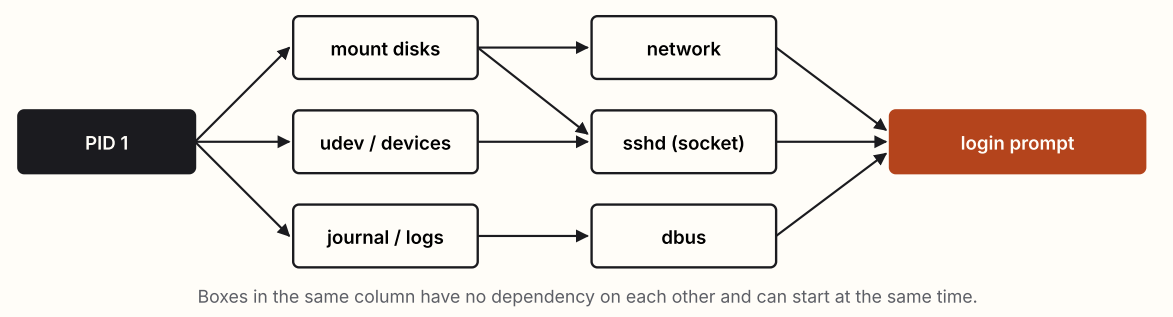
systemd became one of the most argued-about pieces of software in the history of Linux. Its critics objected to how much it absorbed beyond starting services, including logging, device management, network configuration and login sessions, and to the departure from the Unix habit of small tools that each do one thing. Its defenders pointed to faster, more predictable boots and a single consistent way to describe, supervise and restart services. Most major distributions adopted it during the mid-2010s, and a few deliberately did not. Whatever one thinks of the outcome, the argument was really about what PID 1 should be responsible for, and that question has no purely technical answer.
06 Who checks the checker?
Every stage of the boot process runs with complete control of the machine, and every stage chooses what runs next. That makes the boot chain an extraordinarily attractive target. Malware that hides in the bootloader, a so-called bootkit, starts before the operating system and can tamper with the kernel as it loads, which means the kernel’s own defenses never get a fair chance to see it.
The defense is a chain of trust. The idea is that each stage verifies a cryptographic signature on the next before running it, so that a single trusted starting point can vouch for everything that follows. UEFI Secure Boot is the most visible version. The firmware holds a database of trusted keys and refuses to start a bootloader that is not signed by one of them. Because most PCs ship trusting Microsoft’s keys, Linux distributions typically boot through a small first-stage loader called shim, signed by Microsoft, which then verifies the distribution’s own signed GRUB and kernel.
A chain of trust is only as strong as its first link, and that first link has to be something an attacker cannot rewrite. Phones take this most seriously. Their first code lives in a boot ROM, mask ROM etched into the processor at the factory, which verifies the next stage before running it. Because it cannot be modified, it cannot be patched either, and that cuts both ways. In 2019 a researcher published checkm8, an exploit for a bug in the boot ROM of Apple devices built on the A5 through A11 chips. No software update could fix it, because the flawed code was physically part of the chip. Hundreds of millions of devices carry that bug for the rest of their lives.
PC firmware has had its own run of failures. In 2023, the BlackLotus bootkit was found in the wild bypassing Secure Boot on fully updated Windows systems. It exploited a vulnerable but legitimately signed Windows boot component that firmware still trusted, and revoking that trust everywhere turned into a multi-year operation. The same year, researchers disclosed LogoFAIL, a set of flaws in the code that firmware from several vendors uses to parse the manufacturer’s logo image displayed during boot. A malicious image could run code inside the firmware itself, before any signature check that came after it. The lesson in both cases is the same: every piece of code that runs early in the boot process, even the part that draws a picture, is part of the trusted base.
Watch your own machine boot
| Command | What it shows |
|---|---|
dmesg | The kernel’s own log, from the first line it printed. Timestamps show how long each part of initialization took. |
systemd-analyze | Total boot time split into firmware, bootloader, kernel and userspace. Add blame to rank services by startup time, or critical-chain to see the slowest path through the graph. |
efibootmgr -v | The UEFI boot entries stored in firmware variables, and the order in which the firmware tries them. |
pstree -p | The process tree, with PID 1 at the root. |
cat /proc/cmdline | The parameters the bootloader passed to the kernel. |
A signature check proves that code came from someone you trust. It says nothing about whether that code is correct.
Measured boot takes a complementary approach. Instead of blocking unknown code, each stage records a cryptographic hash of the next one into a Trusted Platform Module before running it. The TPM cannot be told to forget a measurement, only to add more, so the final values summarize everything that ran. Disk encryption systems such as BitLocker can then refuse to release the decryption key unless the measurements match those of a known-good boot. The system may not prevent tampering, but it makes tampering visible and denies the tampered system its secrets.
07 The ladder, seen whole
Taken as a whole, the boot sequence is a lesson in how layered systems are built. Each stage exists because the one before it could not do more. The reset vector can hold one jump. The firmware has no memory until it creates some. The boot sector has 446 bytes, and the initramfs has no real disk. Every rung is a small program working within severe constraints to build a slightly larger world for the next one.
It is also a lesson in how long design decisions live. A brand-new x86 processor still starts in a 16-bit mode that imitates a 1978 chip. Disks partitioned in 2026 often still carry a “protective” master boot record, a 1983 data structure that exists only to stop old tools from mistaking a modern disk for an empty one. Compatibility in operating systems is less a feature than a kind of geological record, and the boot process is where the oldest layers lie closest to the surface.
Most of the time none of this is visible. The screen shows a logo, perhaps a spinner, and then a login prompt, all in a few seconds. Behind that short wait, the machine has gone from executing a single instruction at a fixed address to running a complete operating system with thousands of threads, protected memory and a scheduler sharing out every core. It does all of this from scratch, with no memory of having done it before, ev-
Further reading
- Remzi H. Arpaci-Dusseau and Andrea C. Arpaci-Dusseau. Operating Systems: Three Easy Pieces. Arpaci-Dusseau Books. Freely available online.
- UEFI Forum. Unified Extensible Firmware Interface Specification. Current edition at uefi.org.
- The Linux kernel documentation: “The Linux/x86 Boot Protocol” and “Ramfs, rootfs and initramfs.” docs.kernel.org.
- Lennart Poettering. “Rethinking PID 1.” Blog post, April 2010. The original design argument for systemd.
- Vincent Zimmer, Michael Rothman and Suresh Marisetty. Beyond BIOS: Developing with the Unified Extensible Firmware Interface. De Gruyter.
- ESET Research. “BlackLotus UEFI bootkit: Myth confirmed.” WeLiveSecurity, March 2023.
- Binarly Research. “LogoFAIL: Security implications of image parsing during system boot.” Black Hat Europe, 2023.
Research work by Merjen Kakajanova, student of International University for the Humanities and Development. Instructor Nurmyrat Allayarov.